Downloads
The RTS-X software is the platform for the RTS-1 and RTS-2 motion controllers. The graphic user interface (GUI) is common to both controllers and is designed as cross-platform software for multiple operating systems.
Refer to the System Requirements for more info.
You can use the link below to manually download the update package for offline software updates.
You will need to copy this file to a USB drive and select "Update from file" from the update menu.
Click here for more info on software updates.
Software Updates
Software Version 1.4.18 (Hotfix Release)
[2026-3-29]
| Platform | Download |
|---|---|
| Redline HMI (arm64) | Download RTS-X Software Package [303 MB] |
| Windows (x64) | Download RTS-X Setup Package [165 MB] |
| Linux (x64) | Download RTS-X Tarball [276 MB] |
| Mac | Download RTS-X DMG Installer [198 MB] |
| Raspberry Pi (arm64) | Download RTS-X Tarball [249MB] |
Added
- Download speed readout to software update dialog
- Scroll buttons for file manager (Raspberry Pi)
- Support for more touchscreen devices (Redline only)
Fixed
- Software update check failing on MacOS
- Startup units inconsistent if set to imperial and controller is already in imperial mode
- Scaling issues on NumericEntry dialog box on MacOS
- Font scaling issue on spindle warmup dialog when timer was started
- Bug where some wireless gamepads could corrupt jog direction and cause missed steps resulting in machine position error
- Bug where some wireless gamepads could interrupt system movements like homing or probing
- Bug where rotary axis enable could be stuck in the enabled state
- Bug where rotary acceleration units were not displayed correctly
- Bug where some gamepads would not be detected on startup
- M4 command not setting the spindle direction correctly on some VFDs
- G28 not working in MDI mode
Changed
- Improved motion smoothing of gamepad jogging at high speeds
- Scaling and readability enhancements
- Web interface improvements for weak or unreliable network connections
- Improved network manager (Raspberry Pi version) and connections to 2.5GHz networks
- Changed font size on file manager (Raspberry Pi) for improved readability
- Updated web interface so all resources are served locally
- Improvements to jump-to-line including better support for jumping to lines with arcs
Software Version 1.4.9 (Hotfix Release)
[2026-3-3]
Fixed
- Font scaling issues on some widgets introduced by new dynamic scaling
- Disabled multi-drop on web file manager upload
- Disable gamepad jogging while machine is running a toolpath
- E-Stop not resetting axis homed status
- Bug where some high performance linux and Mac computers would hang on firmware update
- Bug where some Fusion 360 toolpaths with tiny arcs would cause gcode parsing to fail
- Edit macro dialog box scaling
- Bug where homing after motor errors cleared would not work
- Web interface now displays software version
- Tweaked size of branch icon in file manager in portrait mode
Changed
- Software update dialog box now allows user to cancel the update process
Software Version 1.4.6
[2026-2-27]
Added
- Support for landscape mode and dynamic scaling
- Defaults for OneFinity Apprentice Series
- Support for middle mouse or wheel button panning in 3D plot
- Icon next to software version to indicate software update available
- Toolpath library folder can now be changed in SETTINGS/GENERAL
- Scrolling file name readout for long toolpath names
- Additional stages to spindle warmup
- Spindle length offset reset button
- Welcome wizard on first install used to load machine defaults
- Support for M64 and M65 commands to control outputs
Changed
- Remote QR code display now includes port number (8000)
- Security improvements to file transfer via web interface
- Support simultaneous connection of multiple clients in web interface
- Improved uploaded file integrity checking in web interface
- Web interface now shows file size in kB and MB
- Machine defaults now include jogging speeds
Fixed
- Bug where Windows permissions would cause crashes when loading gcode files
- Bug where camera feed would not display on remote interface
- Bug where step frequency in motor settings would not update when microstepping was changed
- Bug where invalid characters in a tool path file could cause the software to freeze
- Bug where continuous jogging would not obey axis max velocity
- Bug where controller would not execute dwell commands directly following spindle commands
- Bug where spindle override would cause tool change to fail
- Web interface layout on mobile devices
- Bug where work offset table would only display in metric units
- Bug where jump-to-line would not work on some machines
Software Version 1.3.10
[2026-1-19]
Added
- Added current/target speed readouts to RUN page
- Web Interface: Download option added to file manager
- Web Interface: Progress indicator added for uploading and downloading files
- Web Interface: Added preview for selected file
- Web Interface: Added button to create new folders
- Web Interface: Drag-and-drop files into folders
- Web Interface: Delete folders
- Checkbox in Settings/General to disable prompt when deleting files and folders
Changed
- Additional refinements to motor timing signals for closed-loop systems which exhibit drift on complex 3D carves
Fixed
- Bug where long travel during tool change or tool set would timeout
More Info
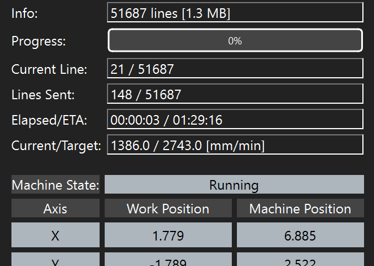
The RUN page of the software has been updated to include a much-requested feature: real-time speed readouts.
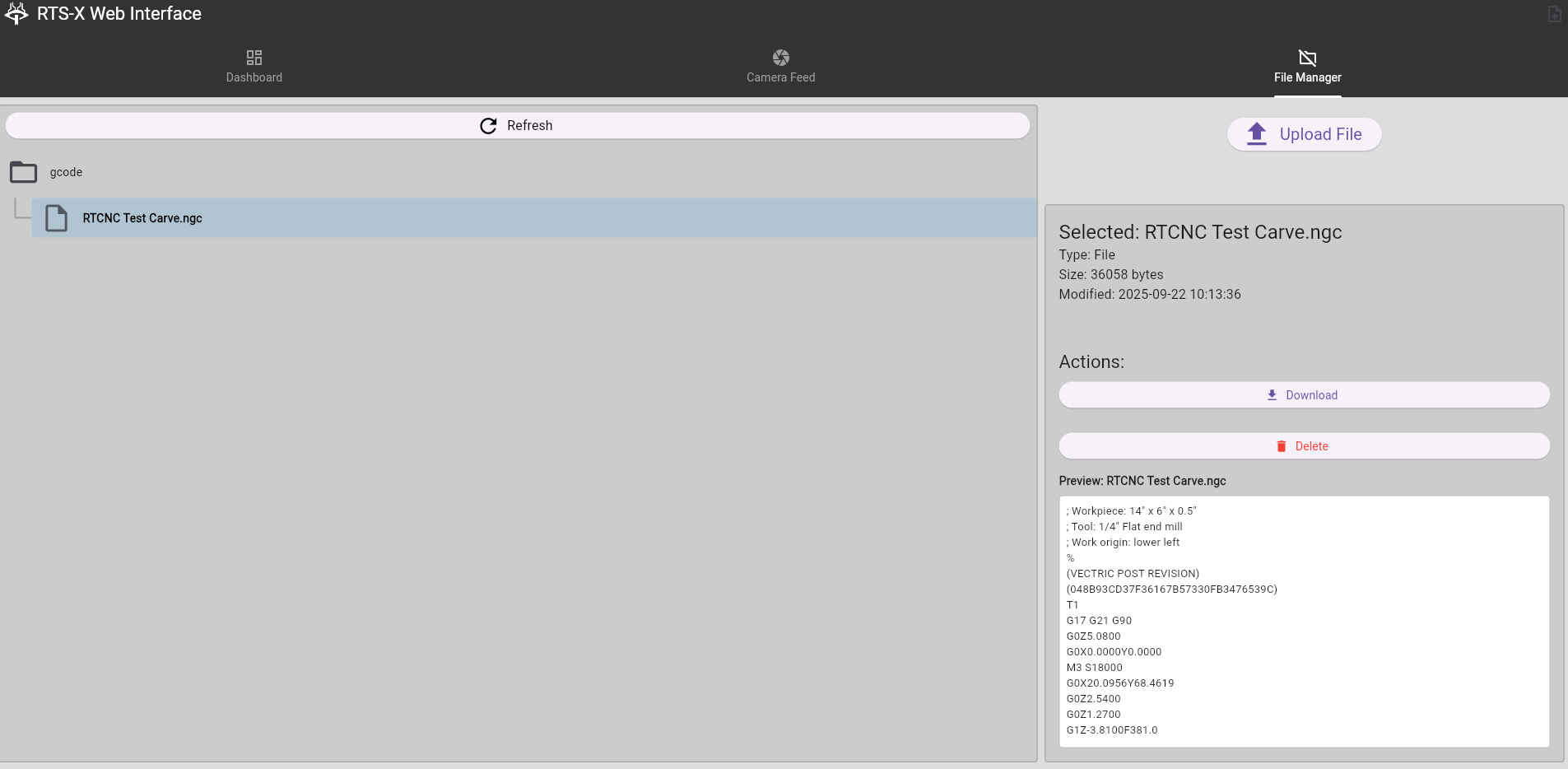
The updated web interface introduces many new quality-of-life features such as downloading files from the controller, progress indicators, preview selected file, folder management, and drag-and-drop file sorting.
Software Version 1.2.2
[2025-12-17]
Added
- New analog and pendant jogging modes
- Flashing indicator for error states in status readout widget
- Color change and button animation when pressing ABORT button
- M7 gcode support to control OUTPUT0
Changed
- Tuned control timing for closed-loop stepper motors to address position drift on some machines
- Improved motion planning and sub-millimeter position accuracy
- Updated 3D rendering of machine travel area to be more accurate to machine geometry
- Updated USB connection dialog screen
- Disabled wrap around on spindle and laser control dials
- Program now automatically rewinds on program completion
Fixed
- Bug where some settings would not be synchronized when opening software and connecting to hardware.
- Bug where acceleration in motor settings was incorrectly calculated when units were set to seconds
- Output indicators in the I/O menu not updating when outputs are changed in gcode (M7, M8, M9, etc)
- Bug when setting motor stepper resolution in imperial
- Bug where rapidly tapping jog buttons in distance mode would throw an error
- Bug where setting min/max travel on rotary axis in imperial units would produce incorrect values>/li>
More Info
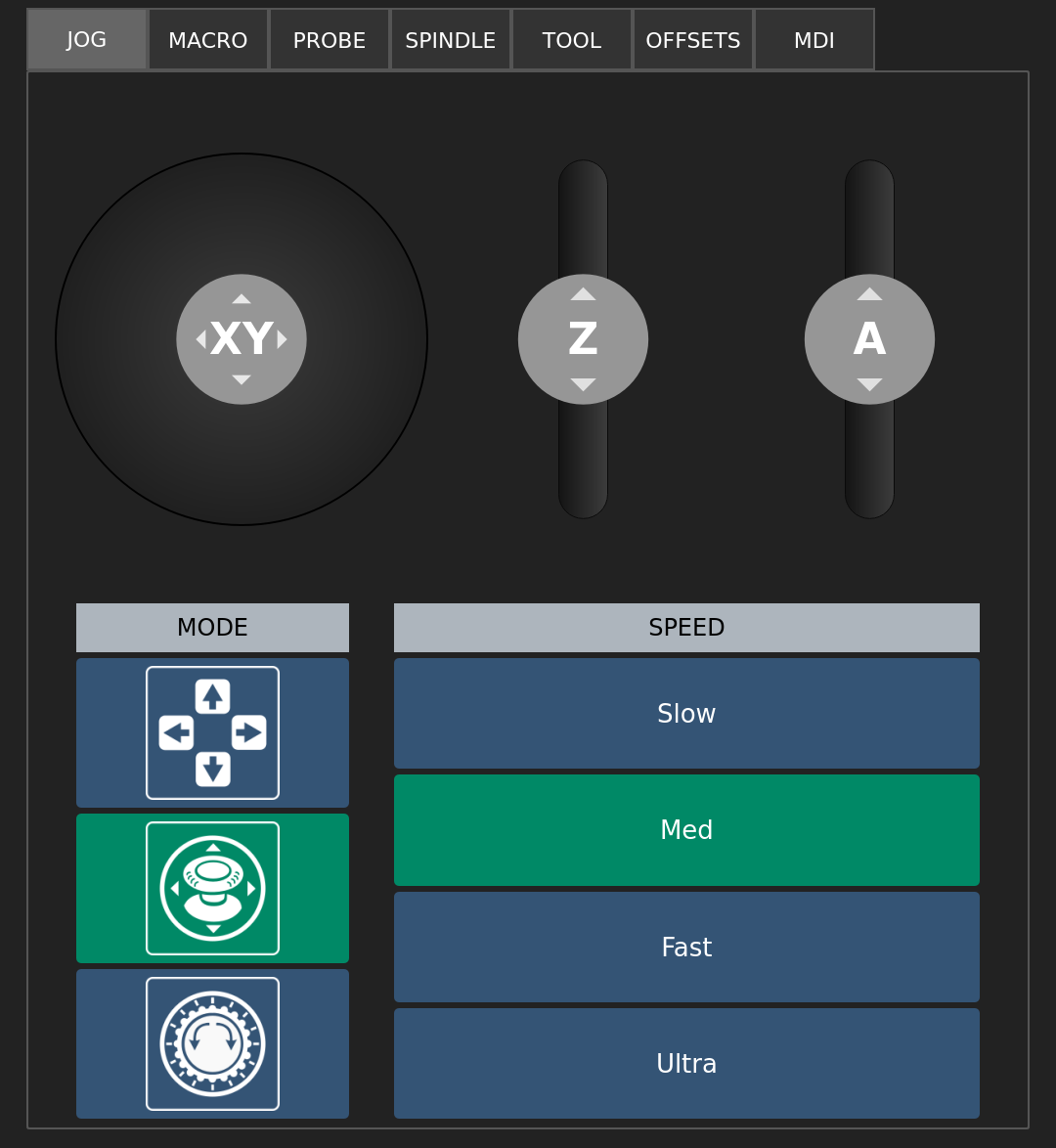
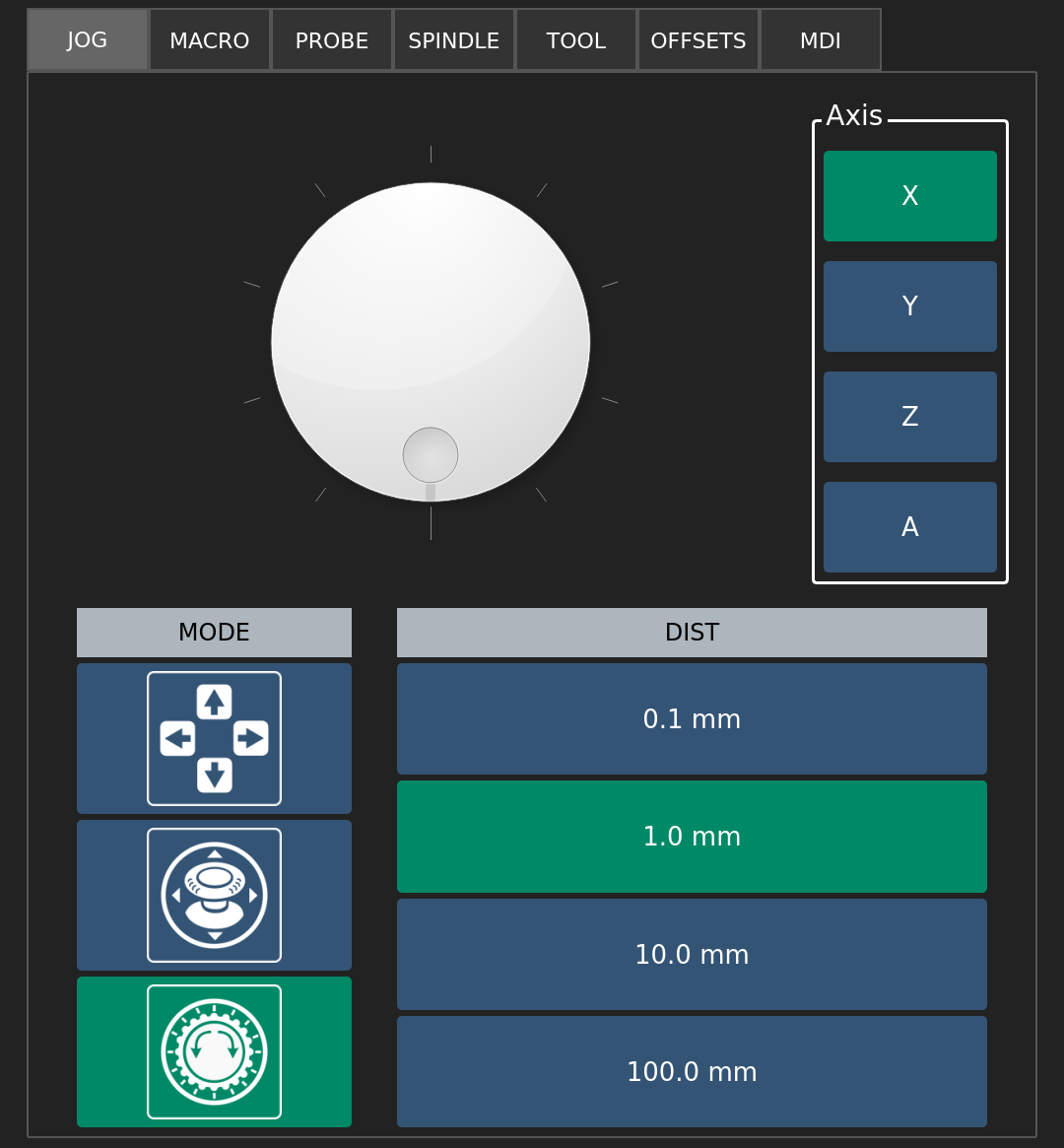
The new jog controls can be accessed from the MAIN screen. The new analog jog controls function like an on-screen game controller with full proportional speed control for travel in any direction with precise speed control. The new pendant jog controls simulate an on-screen pendant with adjustable step distances.
Software Version 1.1.1
[2025-10-21]
Added
- Dwell (G4) support
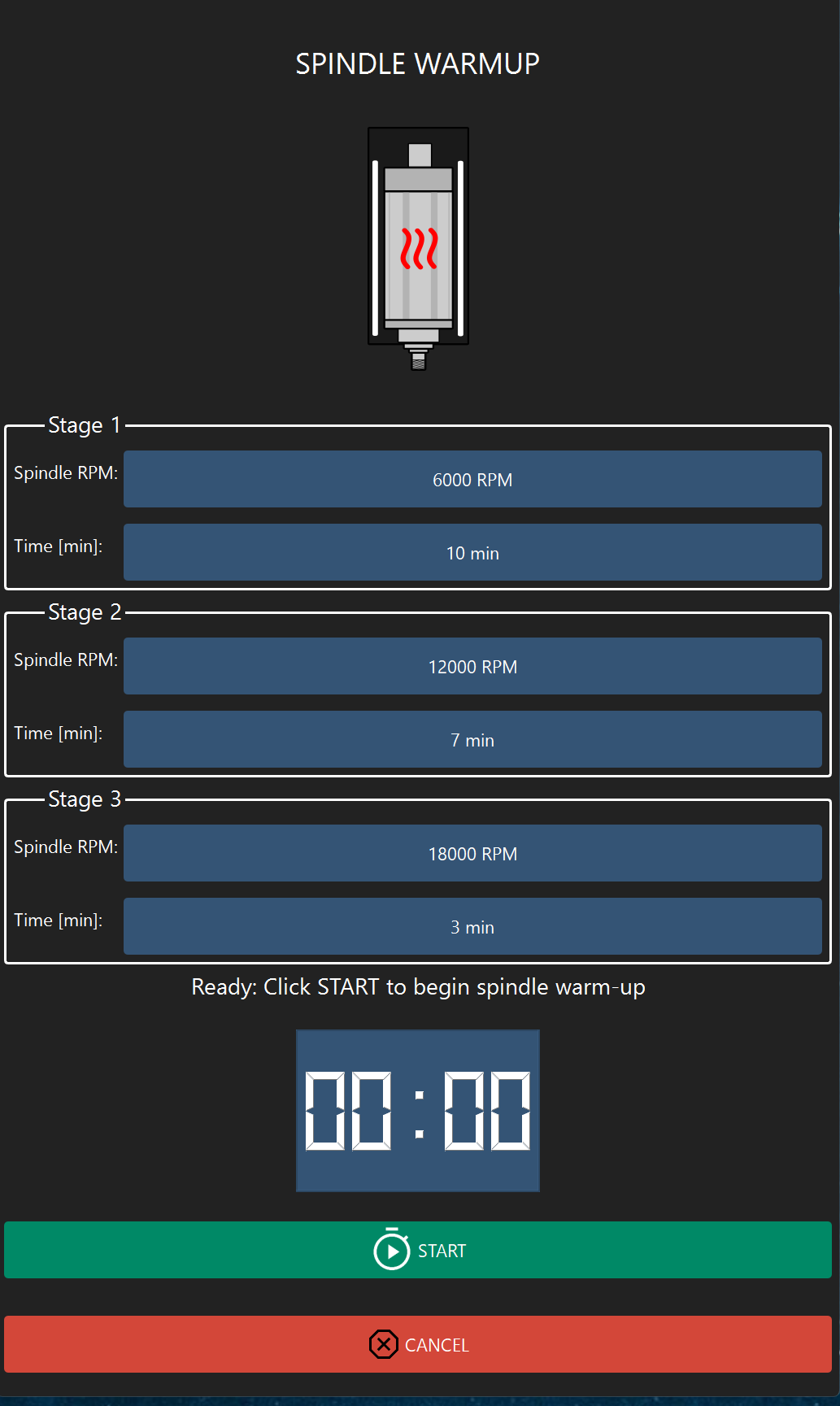
- VFD spindle warmup button and controls
Fixed
- Minor bug where updater would incorrectly identify a new update as being available
- Intermittent bug where continuous jogging following probing would cause WPOS to shift
- Bug where probing wizard was not updating animations during the probing process
- Bug where system jog distances for rotary were incorrect in imperial
More Info
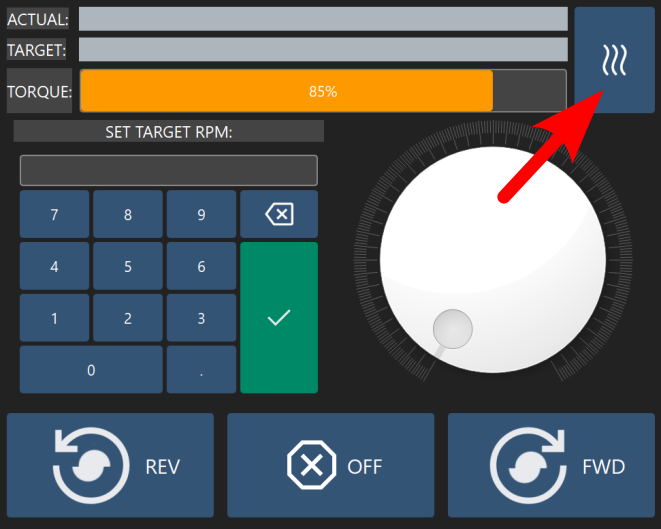
The new spindle warmup widget can be accessed from the Spindle tab on the MAIN screen. Click on the affectionately-named "bacon" button to access the warmup controls.
The widget provides three different warmup stages, each with their own spindle speeds and timers.
The Raspberry Pi 5 image below can be used to restore your system to factory defaults.
Flashing the SD Image
Generally, flashing the SD card image is only required in extreme circumstances to restore the operating system and software to factory defaults.
All files and settings on the target SD card will be lost.
Refer to the RTS-X documentation for instructions on how to flash an SD card image.
SD Card Image
SD Card Image Version 1.4.18
[2026-03-29]
| Platform | Notes | Download |
|---|---|---|
| Redline HMI | Raspberry Pi, Portrait, Touchscreen | Download RTS-X Raspberry Pi 5 Image [3.1 GB] |